
Blackview table 9 portable monitor review: specs, features & comparision

Need more screen space for your laptop without carrying a bulky desktop monitor? The Blackview Table 9 is a 16-inch portable monitor designed to expand your workspace for studying, office work, coding, presentations and entertainment.
It combines a 1920 × 1200 IPS display, a 16:10 aspect ratio, built-in speaker, flexible stand options and USB-C connectivity in a slim design. It also supports up to 100W reverse charging when connected to an external power source.
Whether you work remotely, study, travel frequently or need an additional display for multitasking, this guide covers the genuine specifications, main features, connectivity requirements and differences between the Blackview Table 9, SCM8 and DCM8 Pro.
Blackview Table 9 Specifications
The following specifications are based on Blackview’s official product documentation.
| Specification | Blackview Table 9 |
|---|---|
| Product type | Portable monitor |
| Screen size | 16 inches |
| Panel | IPS |
| Resolution | 1920 × 1200 |
| Refresh rate | 60Hz |
| Brightness | 300 nits |
| Colour coverage | 62% sRGB |
| Aspect ratio | 16:10 |
| Viewing angle | 178° |
| Eye-comfort certification | TÜV SÜD Low Blue Light |
| USB-C ports | 2 full-featured USB-C |
| Video input | 1 Mini HDMI |
| Built-in speaker | Single box speaker |
| Reverse charging | Up to 100W, with external power connected |
| Weight without stand | 650g |
| Weight with stand | 1.27kg |
| Dimensions without stand | 360.7 × 235.7 × 13.2mm |
| Dimensions with stand | 368 × 237 × 29.5mm |
| Materials | Aluminium, PC and ABS |
| Colour | Black |
| Operating system compatibility | Windows, macOS, Android, Linux and ChromeOS |
Source: Blackview Table 9 official specifications.
Key Features of the Blackview Table 9
1. 16-Inch IPS Display with 1920 × 1200 Resolution
The Blackview Table 9 features a 16-inch IPS display with a resolution of 1920 × 1200 pixels.
Its 16:10 aspect ratio provides additional vertical workspace compared with a standard 16:9 display at a similar width. This can be useful when viewing documents, editing spreadsheets, reading webpages or working with code.
The 178° viewing angle helps maintain a usable image when viewing the display from different positions.
2. 60Hz Refresh Rate and 300-Nit Brightness
The monitor supports a 60Hz refresh rate and a rated brightness of 300 nits.
These specifications make it suitable for everyday productivity, online classes, office work, video playback and general laptop use.
However, it is not a high-refresh-rate gaming monitor. Users specifically looking for 144Hz, 165Hz or 240Hz gaming displays should consider a different product category.
3. TÜV SÜD Low Blue Light Certification
Blackview lists TÜV SÜD Low Blue Light certification for the Table 9.
This certification relates to eye-comfort characteristics under the applicable testing criteria. It does not mean that eye strain is impossible, so regular breaks and comfortable screen positioning remain important during long working sessions.
4. Lightweight and Portable Design
The Table 9 weighs approximately 650g without its stand and 1.27kg with the stand.
Without the stand, the monitor measures just 13.2mm thick. This makes the screen easier to carry alongside a laptop than a conventional desktop monitor.
Its aluminium, PC and ABS construction combines different materials to balance portability and structural support.
The supplied stand configuration affects the total weight, so consider the complete carrying setup when comparing portable monitors.
5. Adjustable Stand and Portrait Orientation
Blackview highlights two stand options for the Table 9:
- Mag-Spin stand: Magnetic attachment, 360° rotation and up to 90mm of extension travel.
- Slim kickstand: Magnetic attachment, landscape or portrait positioning and an adjustable angle from 0° to 90°.
These options allow the display to be positioned for different desks and working environments.
Portrait orientation can be particularly useful for reading long documents, viewing code or working with vertically arranged content.
6. USB-C, Mini HDMI and 100W Reverse Charging
The Blackview Table 9 includes two full-featured USB-C ports and one Mini HDMI input.
Its USB-C ports support USB 3.1, DisplayPort Alternate Mode and PD 3.0, rated up to 20V/5A according to the official specifications.
For compatible laptops, a single full-featured USB-C connection can carry the display signal and power as supported by the connected devices.
The Mini HDMI input provides another connection option. You should check the laptop’s video output and the required cable before purchasing.
Important: The advertised 100W reverse charging works only when the Table 9 is connected to an external power source. It should not be interpreted as a guarantee that the monitor can deliver 100W to a laptop in every connection setup.
7. Built-In Speaker and Multi-OS Compatibility
The Table 9 includes a single box speaker, allowing basic audio playback without a separate speaker.
Blackview lists compatibility with Windows, macOS, Android, Linux and ChromeOS.
Actual compatibility depends on the connected device and its available video output. For USB-C video, the device’s port must support DisplayPort Alternate Mode or another compatible video-output method. A USB-C connector alone does not guarantee display support.
Source for the features and connection requirements: Blackview Table 9 official page.
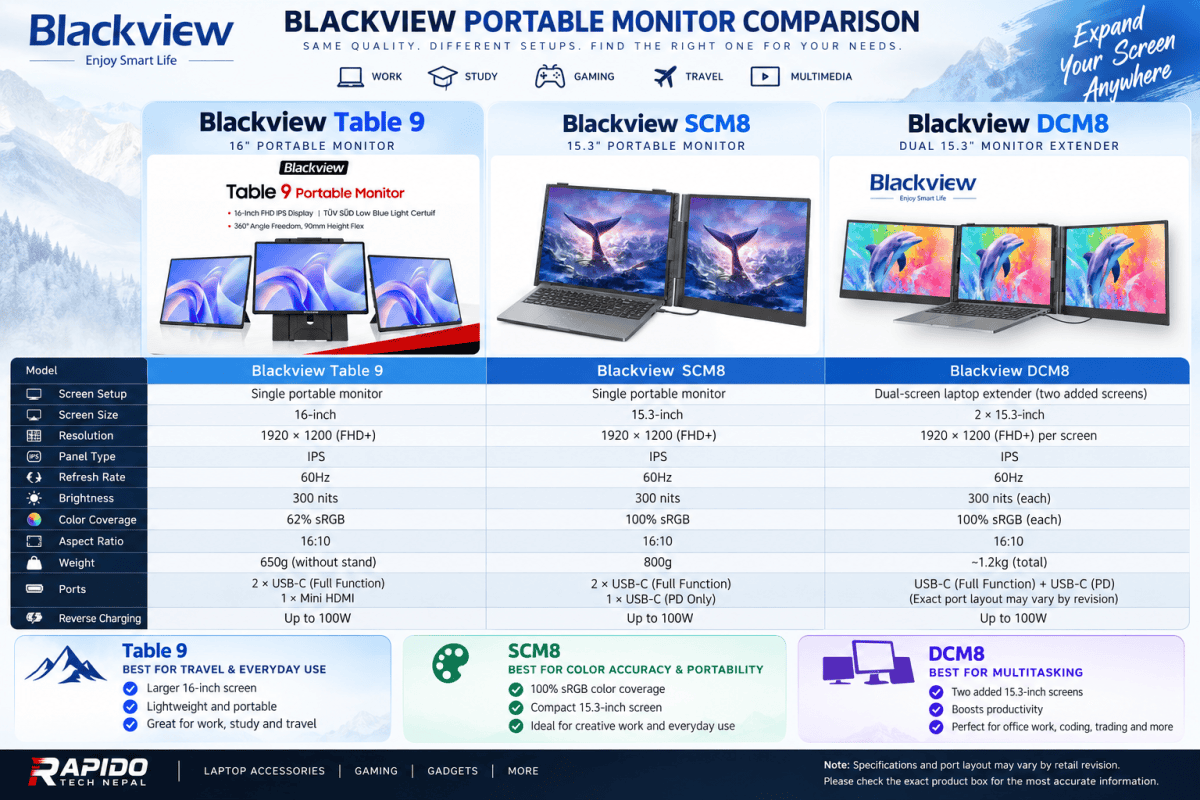
Blackview Table 9 vs SCM8 vs DCM8 Pro
Blackview also offers the SCM8 and DCM8 Pro. The most important difference is the number of displays, followed by colour coverage, size and portability.
| Specification | Table 9 | SCM8 | DCM8 Pro |
|---|---|---|---|
| Display setup | Single screen | Single screen | Dual screens |
| Screen size | 16 inches | 15.3 inches | 2 × 15.3 inches |
| Resolution | 1920 × 1200 | 1920 × 1200 | 1920 × 1200 each |
| Refresh rate | 60Hz | 60Hz | 60Hz |
| Panel | IPS | IPS | IPS |
| Brightness | 300 nits | 300 nits | 300 nits |
| Colour coverage | 62% sRGB | 100% sRGB | 100% sRGB |
| Aspect ratio | 16:10 | 16:10 | 16:10 |
| Weight | 650g without stand; 1.27kg with stand | 800g | 1.2kg |
| Ports | 2 full-featured USB-C + Mini HDMI | 2 full-featured USB-C + 1 USB-C PD | 1 full-featured USB-C/PD connection listed |
| Reverse charging | Up to 100W with external power | Up to 100W | Verify exact retail configuration |
| Main advantage | Larger single display and flexible stand | Lightweight display with wider colour coverage | Two additional displays |
Official sources: Table 9, SCM8 and DCM8 Pro.
Note: Port descriptions and bundled accessories can vary by model or retail revision. Check the exact product documentation before relying on a particular connection arrangement.
Which Blackview Portable Monitor Should You Choose?
Choose the Blackview Table 9 if:
- You prefer a larger, 16-inch single display.
- You want a portable monitor for travel, study or office work.
- You value the flexible Mag-Spin stand and portrait orientation.
- You need USB-C and Mini HDMI input options.
- Your work mainly involves documents, browsing, coding or general productivity.
Its main display trade-off is the specified 62% sRGB colour coverage, which is more limited than the SCM8 and DCM8 Pro specifications.
Choose the Blackview SCM8 if:
- You want a single additional laptop display.
- Colour coverage is a priority.
- You need a lightweight 800g display.
- You prefer its laptop-mounting and kickstand arrangement.
Blackview specifies 100% sRGB coverage for the SCM8, making it the more colour-focused choice on paper. Actual suitability for professional colour-critical work also depends on calibration and other display characteristics.
Choose the Blackview DCM8 Pro if:
- You regularly work across multiple applications.
- You need two extra displays rather than one.
- Your work involves coding, spreadsheets, research or managing several windows.
- You are willing to carry a heavier multi-screen setup.
The DCM8 Pro is designed around two 15.3-inch displays. Before buying, verify the exact mounting, cable and power requirements for your laptop and the particular retail version.
Is the Blackview Table 9 Suitable for Gaming?
The Blackview Table 9 can be used as an additional display for compatible gaming laptops and other devices. Its 16-inch IPS screen and 1920 × 1200 resolution can also be useful for game menus, streaming, guides or other secondary content.
However, its 60Hz refresh rate means it is not the ideal choice for competitive gaming where a higher refresh rate is a priority.
For general use, entertainment and productivity, its specifications are more relevant than those of a dedicated high-refresh-rate gaming monitor.
Blackview Table 9 Price in Nepal
The price of the Blackview Table 9 in Nepal should be checked against the current listing at Rapido Tech Nepal, as local pricing, stock and promotions can change.
Before purchasing, confirm:
- The current selling price.
- Whether the stand and required cables are included.
- The warranty and after-sales support.
- Whether your laptop supports video output over USB-C.
- Whether you need a separate power source for your intended setup.
Explore the available Blackview products at Rapido Tech Nepal to check current availability and pricing.
Frequently Asked Questions
What is the screen size of the Blackview Table 9?
It has a 16-inch IPS display with a resolution of 1920 × 1200 pixels and a 16:10 aspect ratio.
Does the Blackview Table 9 support 100W charging?
It supports up to 100W reverse charging when connected to an external power source. Actual power delivery depends on the connected equipment and supported configuration.
Can I connect the Table 9 to a laptop using USB-C?
Yes, provided the laptop’s USB-C port supports compatible video output, such as DisplayPort Alternate Mode. Otherwise, another compatible video connection may be needed.
Does the Blackview Table 9 support HDMI?
Yes. It includes one Mini HDMI input, so the appropriate Mini HDMI cable or adapter may be required.
Is the Blackview Table 9 suitable for design work?
It can be useful for general design tasks and productivity. However, its official 62% sRGB specification makes it less suitable than a higher-colour-coverage display when accurate colour reproduction is essential.
What is the difference between Table 9 and SCM8?
The Table 9 has a 16-inch display with 62% sRGB coverage, while the SCM8 has a 15.3-inch display with 100% sRGB coverage. They also differ in weight, ports and stand design.
What is the difference between SCM8 and DCM8 Pro?
The SCM8 is a single-screen portable extender. The DCM8 Pro is designed to provide two additional 15.3-inch displays.
Final Thoughts
The Blackview Table 9 is a portable 16-inch monitor built for people who want more workspace without carrying a traditional desktop display. Its 1920 × 1200 IPS panel, 16:10 aspect ratio, lightweight screen body, flexible stand options and USB-C/Mini HDMI connectivity make it a practical option for mobile productivity.
If colour accuracy is your priority, compare it carefully with the SCM8. If you need two extra displays, the DCM8 Pro is the more relevant model.
Choose based on your display requirements, laptop compatibility, portability needs and budget rather than screen size alone.
Explore Blackview products at Rapido Tech Nepal and check current availability before purchasing.
Follow Rapido Tech Nepal on TikTok, Instagram and YouTube for product demonstrations, new arrivals and technology updates.