
AULA F108 vs AULA f108 pro comparison: which mechnical keyboard should you buy?

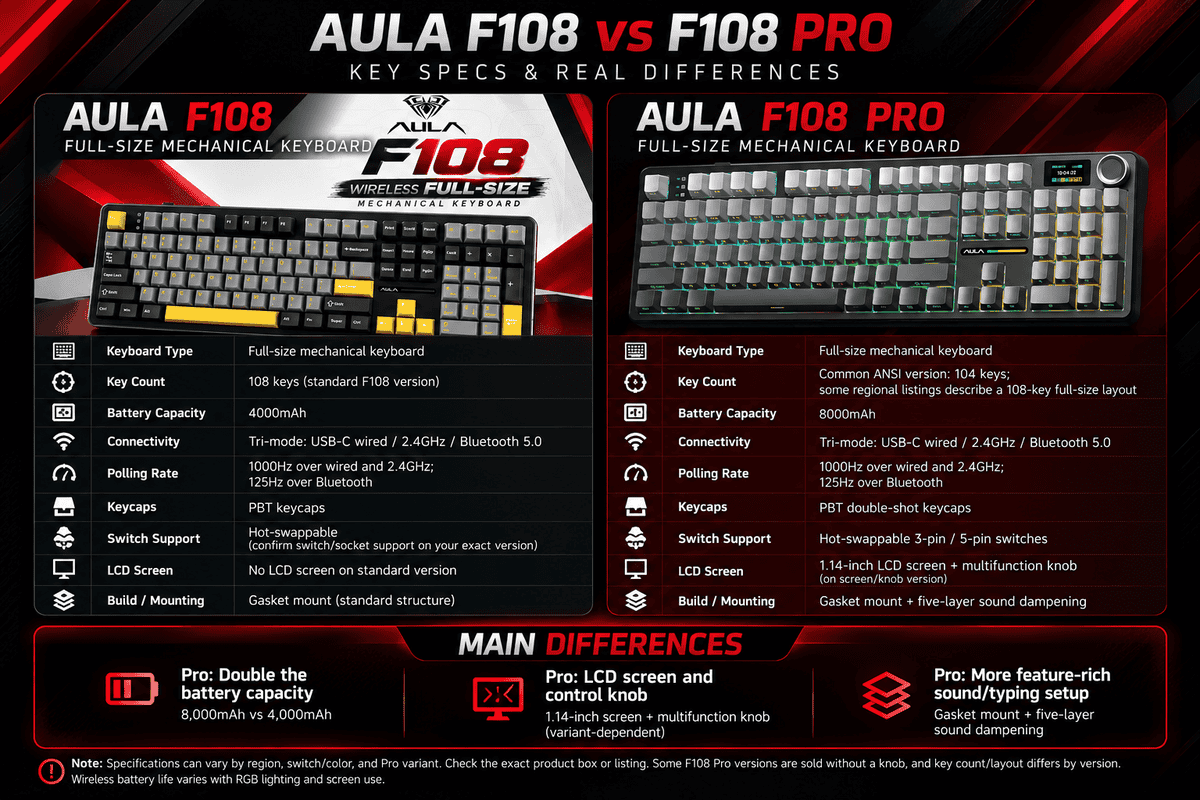
AULA F108 vs AULA F108 Pro Comparison
Looking for a full-size wireless mechanical keyboard for gaming, work or everyday typing? The AULA F108 and AULA F108 Pro are two options worth comparing. Both offer a traditional full-size layout, three connection modes, RGB backlighting, hot-swappable switches and a gasket-mounted construction.
However, the AULA F108 Pro adds features designed for users who want more control and customisation, including a 1.14-inch LCD screen, an aluminium multifunction knob and a larger 8,000mAh battery. The standard AULA F108 keeps things simpler with a 4,000mAh battery and no built-in display or multifunction knob.
In this detailed AULA F108 vs AULA F108 Pro comparison, we will look at their specifications, practical differences, typing features, connectivity and which keyboard makes more sense for your setup.
AULA F108 vs AULA F108 Pro: Quick Comparison
| Feature | AULA F108 | AULA F108 Pro |
|---|---|---|
| Keyboard layout | Full-size, 108 keys | Full-size ANSI layout, 104 keys listed |
| Connectivity | USB-C, 2.4GHz, Bluetooth 5.0 | USB-C, 2.4GHz, Bluetooth 5.0 |
| Battery capacity | 4,000mAh | 8,000mAh |
| Display | No | 1.14-inch colour display |
| Multifunction knob | No | Yes, aluminium knob |
| Switches | Hot-swappable mechanical switches | Hot-swappable mechanical switches |
| Switch compatibility | Check the specific switch/PCB version | 3-pin and 5-pin compatible |
| Mounting structure | Gasket mount | Gasket mount |
| Sound dampening | Multiple internal layers | Five-layer dampening system |
| Backlighting | RGB | South-facing per-key RGB |
| Polling rate | Up to 1,000Hz in wired and 2.4GHz modes on supported versions | Up to 1,000Hz in wired and 2.4GHz modes |
| Bluetooth polling rate | Typically 125Hz on documented versions | Typically 125Hz on documented versions |
| Keycaps | PBT double-shot on documented versions | PBT double-shot |
| Best for | Users who want core features without a screen | Users who want a display, knob and larger battery |
1. Design and Keyboard Layout
AULA F108
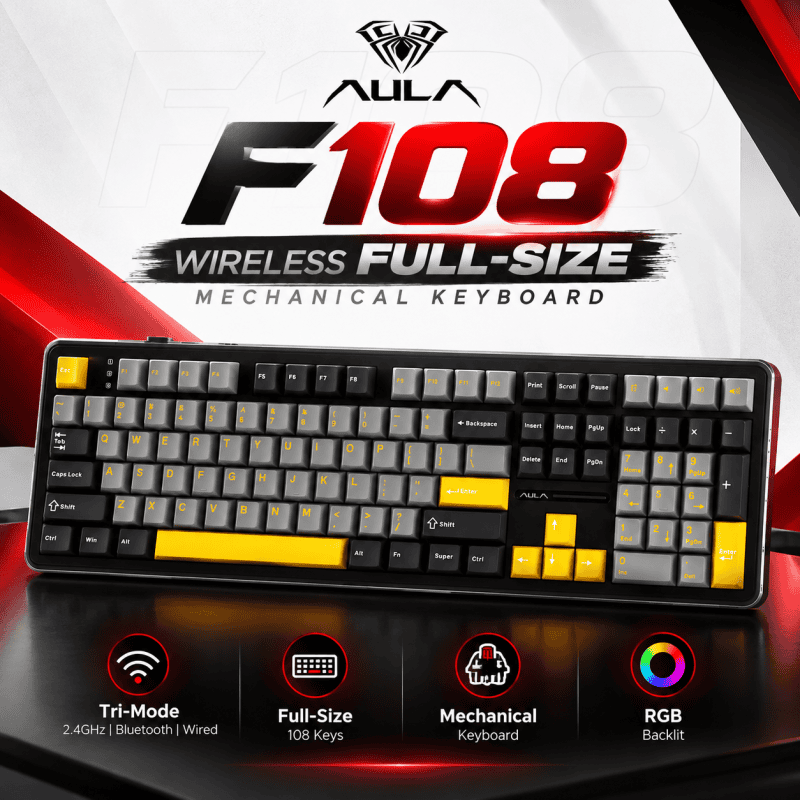
The standard AULA F108 uses a full-size keyboard layout with 108 keys, including the function row, arrow keys, navigation keys and dedicated numeric keypad. This arrangement is useful for users who regularly work with spreadsheets, numbers, documents or productivity software.
Its design focuses on the essentials rather than additional controls. There is no dedicated LCD screen or multifunction knob, leaving the keyboard’s main layout relatively straightforward.
AULA F108 Pro
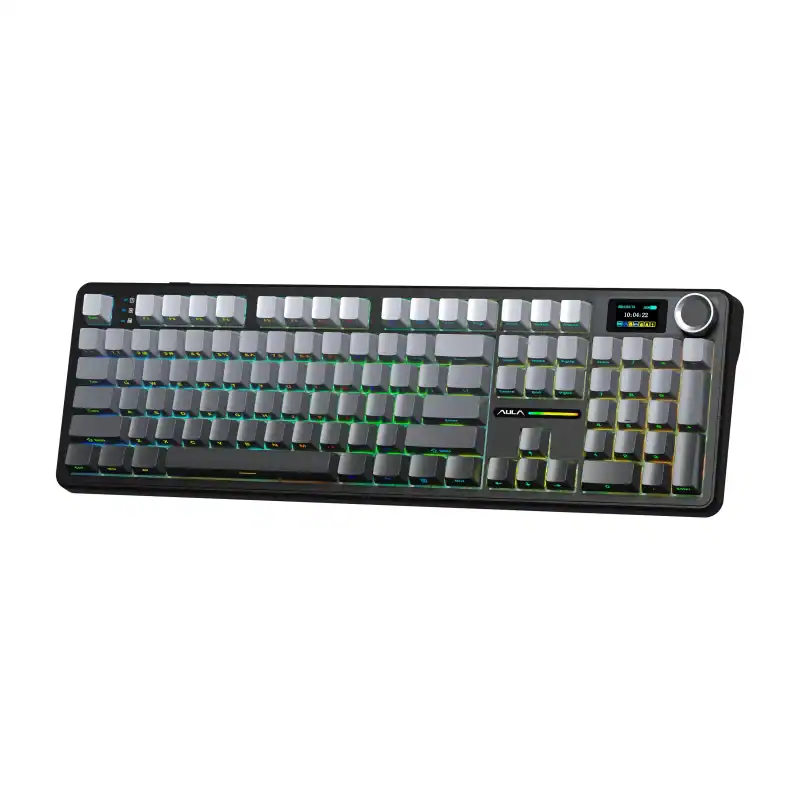
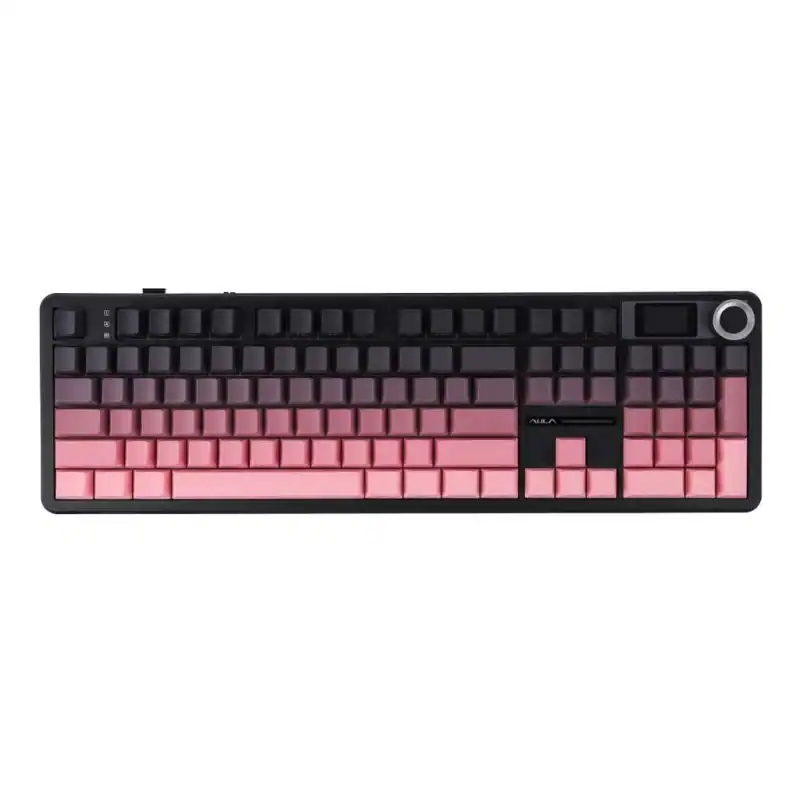
The AULA F108 Pro also follows a full-size ANSI-style layout, but its detailed specifications list 104 keys. It adds a 1.14-inch colour display and an aluminium multifunction knob in the upper-right area.
The screen and knob give the Pro a more feature-focused design, allowing users to access supported settings and controls without relying entirely on keyboard shortcuts.
Important layout detail: AULA and some retailers describe the Pro as a 108-layout or full-size keyboard, while detailed specifications list 104 actual keys. These descriptions are not necessarily the same thing. If the exact number of keys matters to you, check the physical layout of the specific version.
2. Battery Capacity: 4,000mAh vs 8,000mAh
Battery capacity is one of the clearest differences between the two keyboards.
- AULA F108: 4,000mAh battery.
- AULA F108 Pro: 8,000mAh battery.
The F108 Pro has twice the rated battery capacity of the standard F108. This gives it more battery capacity available for wireless use, especially when managing its screen and RGB lighting.
However, twice the capacity does not automatically mean twice the real-world battery life. Actual runtime depends on lighting brightness, display usage, connection mode, battery condition and typing activity. Do not compare battery life using capacity alone.
Both keyboards can be used in wired mode, so you can connect them using USB-C when you prefer a wired setup or need to recharge.
3. Connectivity: Wired, 2.4GHz Wireless and Bluetooth
Both models offer tri-mode connectivity, making them flexible for different setups.
USB-C wired: Useful for a desktop gaming PC, reliable everyday use and charging.
2.4GHz wireless: Uses a dedicated wireless receiver and is the preferred wireless option when low latency matters for gaming.
Bluetooth: Convenient for compatible laptops, tablets and other devices, particularly when you want to reduce cable clutter.
On documented versions, both keyboards support up to 1,000Hz polling in wired and 2.4GHz wireless modes, while Bluetooth operates at a lower polling rate, commonly listed as 125Hz.
For competitive gaming, wired or 2.4GHz wireless is generally the better choice. Bluetooth is more suitable for convenience and everyday typing.
4. LCD Screen and Multifunction Knob
This is the biggest practical difference between the two models.
What does the AULA F108 Pro screen do?
The F108 Pro includes a 1.14-inch colour display. Depending on the supported firmware and software version, it can show keyboard information and provide access to customisation features.
The multifunction knob adds convenient physical control. Supported functions can include volume adjustment, lighting settings and display-related controls.
These features are particularly useful if you frequently adjust your keyboard settings, customise its appearance or want a more interactive desk setup.
Does the standard AULA F108 have a screen?
No. The standard F108 does not include the dedicated LCD screen or multifunction knob.
That does not mean it lacks useful features. It still provides RGB lighting, tri-mode connectivity and hot-swappable switches, which cover many of the needs of a gaming or productivity keyboard.
Which is better? The F108 Pro is the more versatile option for on-keyboard controls. If you rarely change settings and do not need a screen, the standard F108 may be sufficient.
5. Typing Feel, Gasket Mount and Sound Dampening
Both keyboards use a gasket-mounted structure. In mechanical keyboards, this construction uses cushioning elements around the plate or assembly to help soften the typing experience and reduce some unwanted vibration.
Both models also use internal sound-dampening materials. The F108 Pro is advertised with a five-layer dampening system, while the standard F108’s documented construction also includes multiple internal layers.
The exact typing sound and feel depend on several factors:
- The switch option supplied with the keyboard.
- Keycap material and profile.
- Internal foam and dampening components.
- Stabiliser tuning, especially on larger keys.
- Typing technique and the surface underneath the keyboard.
The F108 Pro’s five-layer system is a useful specification, but it does not guarantee that it will sound quieter or better to every user. Sound preference is subjective, and different switch variants can produce noticeably different results.
6. Mechanical Switches and Hot-Swap Support
Both models support mechanical switches and hot-swapping on documented versions. Hot-swapping allows compatible switches to be removed and replaced without soldering.
This is useful if you want to experiment with a different typing feel, replace a faulty switch or customise your keyboard over time.
The F108 Pro’s detailed specifications list compatibility with both 3-pin and 5-pin mechanical switches. For the standard F108, check the exact PCB and switch version before purchasing replacement switches.
Switch options can also vary by seller and region. AULA keyboards may be offered with different linear switch variants, so do not assume that every F108 or F108 Pro has the same switch installed.
Before buying replacement switches, verify their pin compatibility and physical fit.
7. RGB Backlighting
Both keyboards offer RGB backlighting, allowing you to customise the appearance of your setup.
The standard F108 provides RGB lighting without the additional display and knob found on the Pro. The F108 Pro is documented with south-facing, per-key RGB lighting, which positions the LEDs toward the front of the switches.
Lighting effects and customisation options depend on the keyboard’s firmware and supported software. If you plan to use advanced effects or macros, confirm that the software supports your particular model and operating system.
RGB lighting is primarily an aesthetic feature; it does not inherently make one keyboard faster or more responsive than the other.
8. Gaming Performance and Polling Rate
Both keyboards are suitable for everyday gaming, but the most important factors are connection mode, switch preference and the games you play.
On documented versions, both support up to 1,000Hz polling in wired and 2.4GHz wireless modes. This means the Pro’s screen and larger battery do not automatically give it a competitive gaming advantage.
For gaming, consider the following:
- Use wired or 2.4GHz wireless mode when responsiveness matters.
- Choose a switch type that feels comfortable for your games.
- Check compatibility with your operating system and preferred keyboard software.
- Remember that polling rate is only one part of overall input performance.
For casual gaming, competitive titles, work and general typing, either model can be a suitable choice. The Pro’s main advantage is its extra control and customisation features rather than a guaranteed performance improvement.
9. Which AULA Keyboard Should You Buy?
Choose the AULA F108 if:
- You want a traditional full-size keyboard with a numeric keypad.
- You prefer a simpler design without a screen or knob.
- A 4,000mAh battery meets your needs.
- You want tri-mode connectivity, RGB and hot-swappable switches.
- You do not need the Pro’s additional controls.
Choose the AULA F108 Pro if:
- You want a 1.14-inch colour display.
- You prefer a physical multifunction knob.
- You want an 8,000mAh battery.
- You value the Pro’s documented five-layer sound-dampening system.
- You enjoy keyboard customisation and additional on-device controls.
10. AULA F108 vs AULA F108 Pro Price in Nepal
The right choice also depends on the price difference between the two models in Nepal. The Pro’s extra features are useful, but their value depends on how much more you would pay for them.
For current pricing, stock availability, switch options and warranty details, check the product listing at Rapido Tech Nepal rather than relying on an outdated price from another market.
Visit Rapido Tech Nepal to explore available gaming keyboards and accessories.
Frequently Asked Questions
Is the AULA F108 Pro better than the AULA F108?
The F108 Pro offers more features, including a 1.14-inch display, multifunction knob and 8,000mAh battery. The standard F108 still offers tri-mode connectivity, RGB lighting, a gasket-mounted structure and hot-swappable switches. The better option depends on your budget and whether you will use the Pro’s additional features.
What is the main difference between the AULA F108 and F108 Pro?
The biggest differences are battery capacity, the display and multifunction knob. The F108 has a 4,000mAh battery and no display or knob, while the F108 Pro has an 8,000mAh battery and includes both.
Does the AULA F108 Pro have 104 or 108 keys?
Detailed product specifications list 104 actual keys, although some listings describe its layout as 108 or full-size. Check the exact physical layout of the version being sold if the key count is important.
Are both AULA F108 keyboards wireless?
Yes. Both support tri-mode connectivity: USB-C wired, 2.4GHz wireless and Bluetooth. Exact Bluetooth specifications should be checked against the regional product version.
Can I change the switches on the AULA F108 and F108 Pro?
Both support hot-swapping on documented versions. The F108 Pro specifications list 3-pin and 5-pin switch compatibility. Verify the PCB and switch compatibility of the standard F108 before buying replacement switches.
Is the AULA F108 Pro good for gaming?
Yes. It offers a full-size layout, mechanical switches, RGB lighting and wired or 2.4GHz wireless connectivity. Its display and knob are convenience features rather than a guarantee of better gaming performance.
Does the AULA F108 Pro have better battery life?
It has twice the battery capacity of the standard F108: 8,000mAh versus 4,000mAh. Actual battery life depends on lighting, display use, connection mode and other factors, so capacity alone does not establish an exact runtime.
Final Verdict: AULA F108 vs AULA F108 Pro
The AULA F108 and AULA F108 Pro share many of the features that matter in a modern mechanical keyboard, including tri-mode connectivity, RGB lighting, hot-swappable switches and gasket-mounted construction.
The standard F108 is a straightforward choice if you want the core features of a full-size wireless mechanical keyboard without a built-in display or multifunction knob.
The F108 Pro is the better fit if you value extra customisation, convenient physical controls and a larger battery. Its additional features make it more versatile, but whether it is worth the extra cost depends on your needs and the local price difference.
Explore more gaming keyboards and accessories at Rapido Tech Nepal.
- Website: https://rapidotechnepal.com/
- TikTok: https://www.tiktok.com/@rapido.tech_np
- Instagram: https://www.instagram.com/rapidotech_np/
- YouTube: https://www.youtube.com/@RapidoTechNepal